Terminal Customizations
If you use Busly CLI often, you may want to customize your terminal to always display the currently configured transport and/or service control instance. This is especially helpful to quickly know whether you're pointing to your local or a non-production environment.
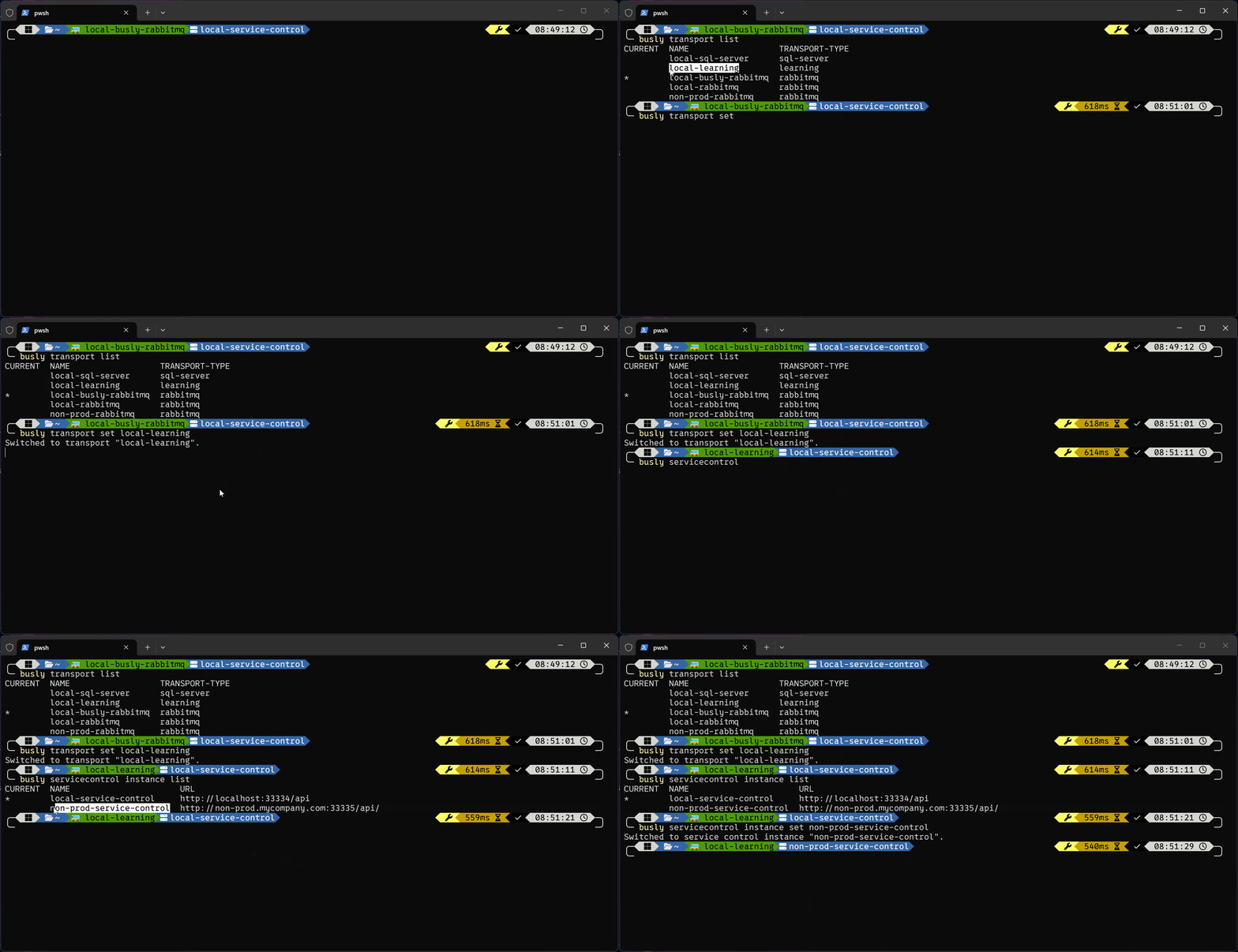
Oh My Posh
Assuming Oh My Posh is installed and configured for your shell, you can extend your theme to display the current transport and service control instance in your prompt.
Shell Profile
Add the following to your shell profile so that Oh My Posh can populate the environment variables used by the theme segments below:
- PowerShell
- zsh
- bash
- fish
- nu
Add to the bottom of your PowerShell profile ($PROFILE):
function Set-EnvVar([bool]$originalStatus) {
    $env:POSH_BUSLY_TRANSPORT_CURRENT=$(busly transport current)
    $env:POSH_BUSLY_SERVICECONTROL_INSTANCE_CURRENT=$(busly servicecontrol instance current)
}
New-Alias -Name 'Set-PoshContext' -Value 'Set-EnvVar' -Scope Global -Force
Add to the bottom of your ~/.zshrc:
function set_poshcontext() {
    export POSH_BUSLY_TRANSPORT_CURRENT=$(busly transport current)
    export POSH_BUSLY_SERVICECONTROL_INSTANCE_CURRENT=$(busly servicecontrol instance current)
}
Add to the bottom of your ~/.bashrc:
function set_poshcontext() {
    export POSH_BUSLY_TRANSPORT_CURRENT=$(busly transport current)
    export POSH_BUSLY_SERVICECONTROL_INSTANCE_CURRENT=$(busly servicecontrol instance current)
}
Add to the bottom of your ~/.config/fish/config.fish:
function set_poshcontext
    set --export POSH_BUSLY_TRANSPORT_CURRENT $(busly transport current)
    set --export POSH_BUSLY_SERVICECONTROL_INSTANCE_CURRENT $(busly servicecontrol instance current)
end
Add to the bottom of your Nushell env.nu:
$env.SET_POSHCONTEXT = {
    $env.POSH_BUSLY_TRANSPORT_CURRENT = (busly transport current);
    $env.POSH_BUSLY_SERVICECONTROL_INSTANCE_CURRENT = (busly servicecontrol instance current);
}
Theme Configuration
Add the following segments to your Oh My Posh theme JSON:
{
  "$schema": "https://raw.githubusercontent.com/JanDeDobbeleer/oh-my-posh/main/themes/schema.json",
  "blocks": [
    {
      "type": "prompt",
      "alignment": "left",
      "segments": [
        // ... your existing segments ...
        {
          "type": "text",
          "style": "powerline",
          "powerline_symbol": "\ue0b0",
          "background": "#4e9a06",
          "foreground": "#000000",
          "template": "🚌 {{ .Env.POSH_BUSLY_TRANSPORT_CURRENT }}"
        },
        {
          "type": "text",
          "style": "powerline",
          "powerline_symbol": "\ue0b0",
          "background": "#3465a4",
          "foreground": "#ffffff",
          "template": "\uf233 {{ .Env.POSH_BUSLY_SERVICECONTROL_INSTANCE_CURRENT }}"
        },
      ]
    }
  ],
  "final_space": true
}